
You hit publish. You waited. You checked Google Search Console. And there it is again: "Discovered, currently not indexed." No traffic. No rankings. No visibility. Just silence.
If this sounds familiar, you're not alone. Since Google's latest indexing update, thousands of site owners have noticed the same pattern: pages that would have been indexed within hours a year ago are now sitting untouched for weeks.
Here's the part most articles skip: indexing isn't a technical afterthought. It's the gate you have to pass through before rankings even become possible. A page can be perfectly optimised, beautifully written, and still earn zero traffic simply because Google never added it to the index in the first place.
Google's crawling and indexing systems have changed significantly. The search engine is now far more selective about which pages it stores, largely because of the flood of AI-generated content, thin affiliate pages, and duplicate templates published every day. Google isn't trying to punish you; it's trying to protect the quality of its index. But that means your pages need to earn their spot.
In this guide, you'll learn exactly how Google's indexing process works, what changed in the latest update, the 15 most common reasons pages don't get indexed, how to read every status inside Google Search Console, and a step-by-step recovery checklist you can start using today.
Understanding Google's Indexing Process
Before fixing an indexing problem, it helps to know where things actually break down. Indexing isn't one step; it's a pipeline with five distinct stages.
- URL Discovery: Google finds your URL through sitemaps, internal links, backlinks, or your existing pages.
- Crawling: Googlebot visits the page and downloads its HTML, CSS, and JavaScript.
- Rendering: Google processes the page the way a browser would, executing JavaScript to see the final content.
- Indexing: If the page passes quality checks, Google stores it in its massive database.
- Ranking: Only indexed pages compete for a position in search results.
Many site owners assume crawling and indexing are the same thing. They're not, and that confusion is exactly why so many indexing problems go undiagnosed.
|
Stage |
What Happens |
Common Misconception |
|
Crawling |
Googlebot visits and downloads the page |
"If it's crawled, it's indexed" false |
|
Indexing |
Google evaluates and stores the page in its database |
"Indexing means ranking" false |
|
Ranking |
Indexed pages are scored and positioned for queries |
Ranking can't happen without indexing first |
Think of it like a library. Crawling is the librarian walking past your book. Indexing is the librarian deciding it's worth shelving. Ranking is where your book gets placed on the shelf. Skip the shelving decision, and it doesn't matter how good the book is.
What's New in Google's Latest Indexing Update?
Google's recent indexing changes lean heavily on one theme: quality before quantity. Here's what's shifted.
- Smarter quality evaluation: Google now assesses content depth and originality earlier in the pipeline, before deciding whether a page deserves index space.
- Crawl prioritisation: Googlebot spends its limited crawl budget on sites that consistently publish valuable, updated content, and deprioritises sites with a history of thin or duplicate pages.
- AI-generated content assessment: Google isn't blocking AI writing outright, but unedited, generic AI output is increasingly filtered out before indexing.
- Helpful Content signals: Site-wide quality signals now influence whether individual pages get indexed, not just how they rank.
- Duplicate detection: Near-identical pages, templated location pages, and scraped content are grouped and often excluded.
- Spam improvements: Scaled content abuse and expired-domain abuse are treated more aggressively.
- Mobile-first indexing: Google indexes the mobile version of your page by default, so mobile rendering issues now directly block indexing.
- Technical quality signals: Page speed, crawl errors, and server stability weigh more heavily into indexing decisions than before.
Expert Insight Box: At Ingenious HiTech, we've noticed indexing delays are now correlated more with site-wide content quality than with individual page optimisation. Cleaning up thin, outdated, or duplicate pages across a domain often gets new pages indexed faster than any single on-page fix.
15 Reasons Your Pages Aren't Getting Indexed
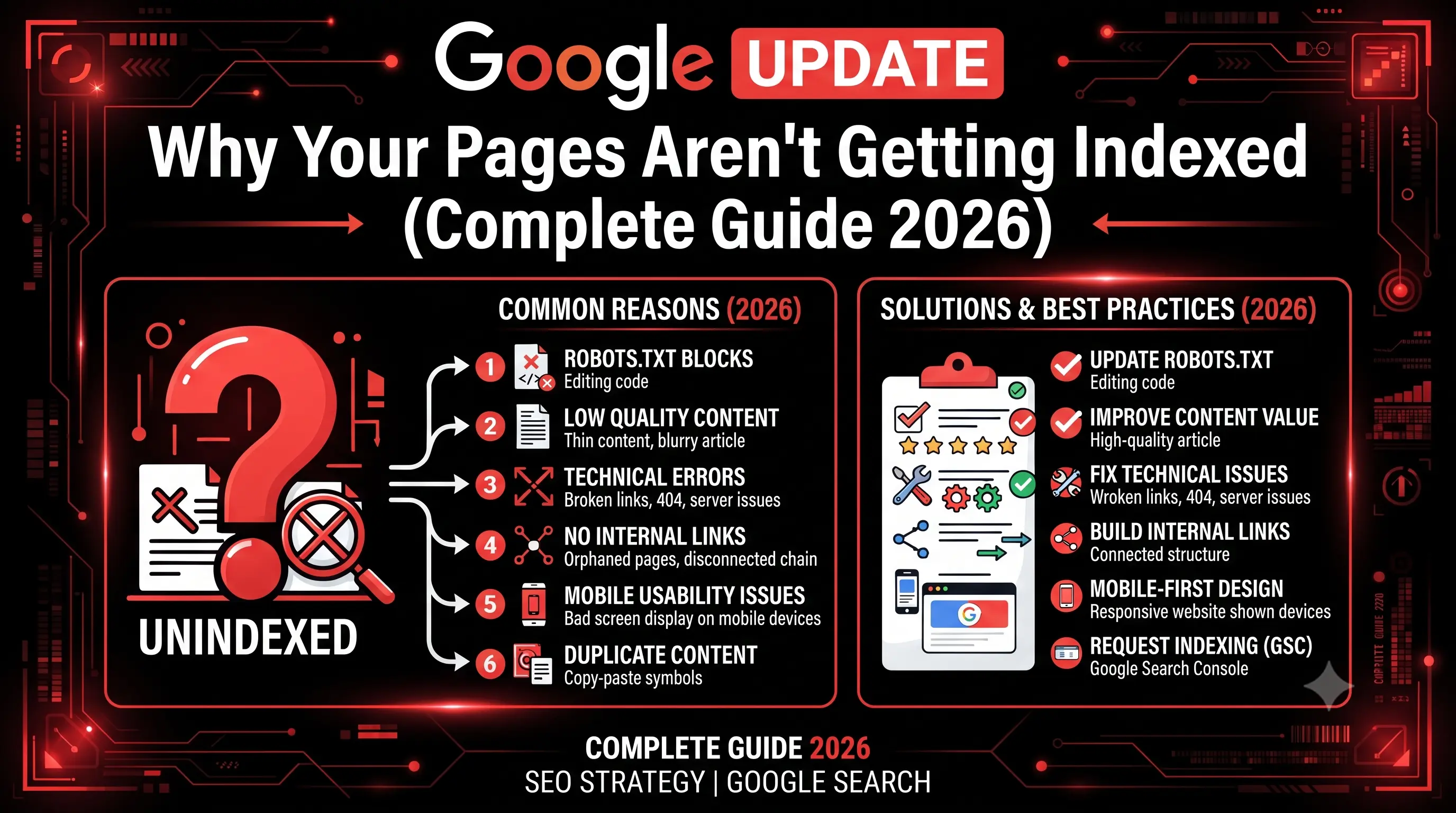
1. Thin Content
Why it happens: Pages under 300-400 words with little unique value rarely convince Google to allocate index space. How to identify it: Compare your word count and depth against top-ranking competitors for the same query. How to fix it: Expand with original insights, data, examples, or expert commentary, not filler. SEO Expert Tip: Depth beats length. A focused 800-word page can outperform a padded 2,000-word one.
2. Duplicate Content
Why it happens: Copied text, syndicated articles, or near-identical product descriptions confuse Google's canonicalization system. How to identify it: Use a plagiarism checker and review Search Console's "Duplicate" reports. How to fix it: Rewrite duplicate sections and set clear canonical tags. SEO Expert Tip: Even paraphrased duplicate structure can trigger this; vary sentence patterns, not just words.
3. AI Content Without Human Editing
Why it happens: Raw, unedited AI output often lacks the specificity and experience-based detail Google's quality systems look for. How to identify it: Check for generic phrasing, repeated structures, and a lack of real examples. How to fix it: Add first-hand insights, data, and a genuine editorial pass before publishing. SEO Expert Tip: Google doesn't penalise AI assistance; it penalises content that reads as unedited and generic.
4. Noindex Tag
Why it happens: A leftover noindex tag from staging, a plugin default, or a CMS misconfiguration tells Google to skip the page entirely. How to identify it: View page source or use the URL Inspection Tool. How to fix it: Remove the tag and request indexing again. SEO Expert Tip: Always audit noindex tags after a site migration or theme change.
5. Blocked by Robots.txt
Why it happens: A disallow rule prevents Googlebot from even crawling the page. How to identify it: Test the URL in the Robots.txt Tester inside Search Console. How to fix it: Update the robots.txt file to allow the relevant path. SEO Expert Tip: Double-check robots.txt after redesigns; developers often forget to remove staging-site blocks.
6. Poor Internal Linking
Why it happens: Pages with few or no internal links appear unimportant to Google. How to identify it: Run a site crawl and check internal link count per URL. How to fix it: Link to the page from relevant, higher-authority pages on your site. SEO Expert Tip: New pages should get at least 3–5 contextual internal links within the first week.
7. Orphan Pages
Why it happens: Pages with zero internal links are nearly invisible to crawlers. How to identify it: Cross-reference your sitemap against your internal link graph. How to fix it: Add the page into your navigation, category pages, or related-content sections. SEO Expert Tip: Orphan pages are one of the most overlooked indexing killers on large websites.
8. Wrong Canonical
Why it happens: A canonical tag pointing to a different URL tells Google to index that page instead. How to identify it: Inspect the canonical tag in page source or via URL Inspection. How to fix it: Set self-referencing canonicals unless consolidation is intentional. SEO Expert Tip: Audit canonicals after any CMS or plugin update; they break silently.
9. Slow Website
How to identify it: Run PageSpeed Insights and check Core Web Vitals. Why it happens: Slow-loading pages consume more crawl resources, reducing how much of your site Google can process. How to fix it: Compress images, use caching, and reduce render-blocking scripts. SEO Expert Tip: Server response time (TTFB) matters more for crawling than most people realise.
10. Server Errors
Why it happens: 5xx errors during crawl attempts signal instability, causing Google to back off. How to identify it: Check the "Server Error" report in Search Console. How to fix it: Work with your hosting provider to resolve uptime and resource issues. SEO Expert Tip: Repeated server errors can quietly lower crawl frequency site-wide.
11. JavaScript Rendering Problems
Why it happens: If content only appears after JavaScript executes, and rendering fails or is delayed, Google may index a blank page. How to identify it: Use the URL Inspection Tool's rendered HTML preview. How to fix it: Implement server-side rendering or dynamic rendering for critical content. SEO Expert Tip: Never hide primary content behind client-side JavaScript alone.
12. Poor XML Sitemap
Why it happens: A missing, outdated, or error-filled sitemap makes discovery harder. How to identify it: Check the Sitemaps report in Search Console for errors. How to fix it: Regenerate a clean sitemap and submit it directly. SEO Expert Tip: Remove noindexed or redirected URLs from your sitemap; they waste crawl trust.
13. Low Website Authority
Why it happens: New or low-authority domains receive smaller crawl budgets and less indexing priority. How to identify it: Compare your backlink profile and domain history to competitors. How to fix it: Build quality backlinks and publish consistently to grow authority over time. SEO Expert Tip: Authority is earned domain-wide; it's not something a single page fixes alone.
14. Soft 404 Pages
Why it happens: Pages that look empty or error-like (even with a 200 status code) get flagged as low value. How to identify it: Check the "Soft 404" report in Search Console. How to fix it: Add substantial content or return a proper 404/410 status for genuinely missing pages. SEO Expert Tip: Thin category or filtered pages are frequent soft 404 culprits.
15. Crawl Budget Issues
Why it happens: Large sites with excessive low-value URLs (filters, parameters, duplicates) spread crawl budget too thin. How to identify it: Review server logs to see which URLs Googlebot actually visits. How to fix it: Block or consolidate low-value URL patterns and prioritise key pages in internal linking. SEO Expert Tip: Crawl budget matters most for sites with thousands of URLs; small sites rarely hit this ceiling.
Google Search Console Indexing Report Explained
|
Status |
Meaning |
Common Reason |
Solution |
|
Indexed |
Page is stored and eligible to rank |
_ |
Monitor performance |
|
Discovered – Currently Not Indexed |
Google knows the URL but hasn't crawled it yet |
Low crawl priority or weak internal linking |
Improve links and request indexing |
|
Crawled – Currently Not Indexed |
Google crawled it but chose not to index it |
Quality or duplication concerns |
Improve content depth and originality |
|
Duplicate Without User-Selected Canonical |
Google picked a canonical on your behalf |
No canonical tag set |
Add explicit canonical tags |
|
Alternate Page with Proper Canonical |
Page correctly points elsewhere |
Intentional duplication |
No action needed if intentional |
|
Excluded by Noindex |
Page has a noindex directive |
Manual or accidental tag |
Remove noindex if indexing is wanted |
|
Blocked by Robots.txt |
Crawling is disallowed |
Robots.txt rule |
Update robots.txt |
|
Soft 404 |
Page appears empty despite 200 status |
Thin or missing content |
Add real content or return true 404 |
|
Redirect Error |
Redirect chain failed or looped |
Misconfigured redirects |
Fix redirect chains |
|
Server Error (5xx) |
Server failed to respond during crawl |
Hosting or resource issues |
Resolve server stability |
How to Check Whether Google Has Indexed Your Website
- site: search operator: Search site:yourdomain.com to see a rough snapshot of indexed pages.
- Google Search Console: The Pages report shows exact indexed vs. excluded counts.
- URL Inspection Tool: Check real-time indexing status for any single URL.
- XML Sitemap: Compare submitted URLs against indexed URLs for gaps.
- Server Logs: Reveal exactly when and how often Googlebot visits your pages.
Step-by-Step Google Indexing Recovery Checklist
- Run a complete technical audit of the site.
- Inspect the affected URL in Search Console.
- Improve content quality and depth.
- Fix weak or missing internal links.
- Correct canonical tag issues.
- Update and resubmit your XML sitemap.
- Improve page speed and Core Web Vitals.
- Resolve crawl and server errors.
- Request indexing manually for priority pages.
- Monitor the Pages report weekly for changes.
How to Get New Pages Indexed Faster
- Publish genuinely unique, well-researched content.
- Build topical authority around your core subject areas.
- Strengthen internal linking to new pages immediately.
- Earn backlinks from relevant, trustworthy sites.
- Improve EEAT with author bios, credentials, and real expertise.
- Add structured data to help Google understand the page.
- Refresh and update older, underperforming pages regularly.
- Optimise Core Web Vitals across the site.
- Keep your XML sitemap current and submit it after major updates.
- Share new content through email, social, and relevant communities to generate early signals.
Common Google Indexing Mistakes
- Publishing hundreds of thin AI-generated pages at once.
- Ignoring Search Console reports for weeks or months.
- Using slow, unreliable, or shared hosting.
- Allowing duplicate pages to pile up unchecked.
- Setting up incorrect or chained redirects.
- Leaving weak, templated service pages live.
- Expecting indexing without any backlinks or authority.
- Accidentally blocking CSS, JS, or image resources Google needs to render pages.
Advanced SEO Techniques for Better Indexing
- Entity SEO: Structure content around clearly defined people, places, and things Google can recognise.
- Semantic SEO: Cover related concepts and questions, not just exact keywords.
- Topic Clusters: Group related pages under a pillar page to strengthen internal linking and authority.
- Digital PR: Earn authoritative backlinks and mentions to boost domain trust.
- Content Refresh: Update outdated statistics, examples, and sections on existing pages.
- Crawl Budget Optimisation: Trim low-value URLs so Googlebot focuses on pages that matter.
- Log File Analysis: Study server logs to see exactly how Googlebot behaves on your site.
- Programmatic SEO: When done carefully, template-driven pages can scale but only with genuine unique value per page.
Google Indexing Myths vs Facts
|
Myth |
Fact |
|
Request Indexing guarantees indexing |
It only prompts a crawl; indexing still depends on quality |
|
Google indexes every page |
Google selectively indexes based on value and crawl priority |
|
Backlinks instantly index pages |
Backlinks help discovery but don't guarantee immediate indexing |
|
AI content is banned |
AI content is allowed; low-quality, unedited content is not |
|
Sitemap guarantees indexing |
A sitemap aids discovery but never guarantees indexing |
Google Indexing Checklist
|
Task |
Importance |
Recommended Tool |
Frequency |
|
Check indexing status |
High |
Search Console |
Weekly |
|
Audit for noindex/robots issues |
High |
URL Inspection Tool |
Monthly |
|
Review Core Web Vitals |
Medium |
PageSpeed Insights |
Monthly |
|
Update XML sitemap |
High |
CMS/Sitemap Generator |
After major changes |
|
Fix internal linking gaps |
High |
Site Crawler (e.g., Screaming Frog) |
Monthly |
|
Monitor server errors |
High |
Search Console + Server Logs |
Weekly |
|
Validate structured data |
Medium |
Rich Results Test |
Monthly |
|
Refresh outdated content |
Medium |
Content Calendar |
Quarterly |
Best Free Google Tools for Monitoring Indexing
- Google Search Console: Your primary source for indexing status and crawl data.
- Google Analytics: Confirms whether indexed pages are actually driving traffic.
- PageSpeed Insights: Measures speed and Core Web Vitals affecting crawl efficiency.
- Rich Results Test: Validates structured data implementation.
- Schema Validator: Checks schema markup for errors.
- Robots Tester: Confirms whether robots.txt is blocking important pages.
Frequently Asked Questions
1. Why isn't my new page getting indexed?
It's usually a mix of low crawl priority, weak internal linking, or content that doesn't yet meet Google's quality bar.
2. How long does Google indexing normally take?
It ranges from a few hours to several weeks, depending on site authority and crawl frequency.
3. Does requesting indexing in Search Console actually help?
It can speed up the next crawl, but it won't force indexing if quality issues remain.
4. Can duplicate content stop indexing completely?
Yes, Google often indexes only one version of near-duplicate pages and excludes the rest.
5. Is AI-written content bad for indexing?
Not inherently. Unedited, generic AI content is the actual problem, not AI assistance itself.
6. Why does Search Console say "Crawled – currently not indexed"?
Google visited the page but decided it wasn't valuable enough to store, usually a quality signal.
7. Does site speed really affect indexing?
Yes, slow pages consume more crawl budget and can reduce how often Google revisits your site.
8. Can old pages lose their indexed status?
Yes, especially if they become outdated, thin, or get deprioritised in favour of newer, stronger content.
9. Does a sitemap guarantee indexing?
No. A sitemap only helps discovery; indexing still depends on quality and crawl decisions.
10. What's the fastest way to fix indexing issues?
Start with a technical audit, fix the highest-impact errors first, then request indexing for priority pages.
Conclusion
Indexing problems rarely come from one single mistake; they're usually a combination of technical gaps, thin content, and crawl prioritisation working against you. The good news is that every reason covered in this guide is fixable once you know where to look.
Start with Google Search Console, work through the checklist above, and prioritise quality over quantity in everything you publish. Indexing health isn't a one-time fix; it's an ongoing part of technical SEO that deserves regular attention.
If your pages are stuck in limbo despite your best efforts, it might be time for a professional audit. Ingenious HiTech's Technical SEO and Website Audit services are built to diagnose exactly why Google isn't indexing your pages and fix it for good. Reach out to our team today and get your content the visibility it deserves.