
When a pipe bursts, an AC unit fails in July, or a roof starts leaking during a storm, most homeowners do not browse. They search, they call the first company that looks trustworthy, and they book. That moment, the few seconds between a search and a phone call, is where home service businesses either win a customer or lose one to a competitor.
Google Local Services Ads for home service businesses were built for exactly that moment. Instead of competing on keywords and landing pages, eligible businesses show up at the top of relevant local searches with a simple promise: verified, reviewed, ready to help.
What Are Google Local Services Ads?
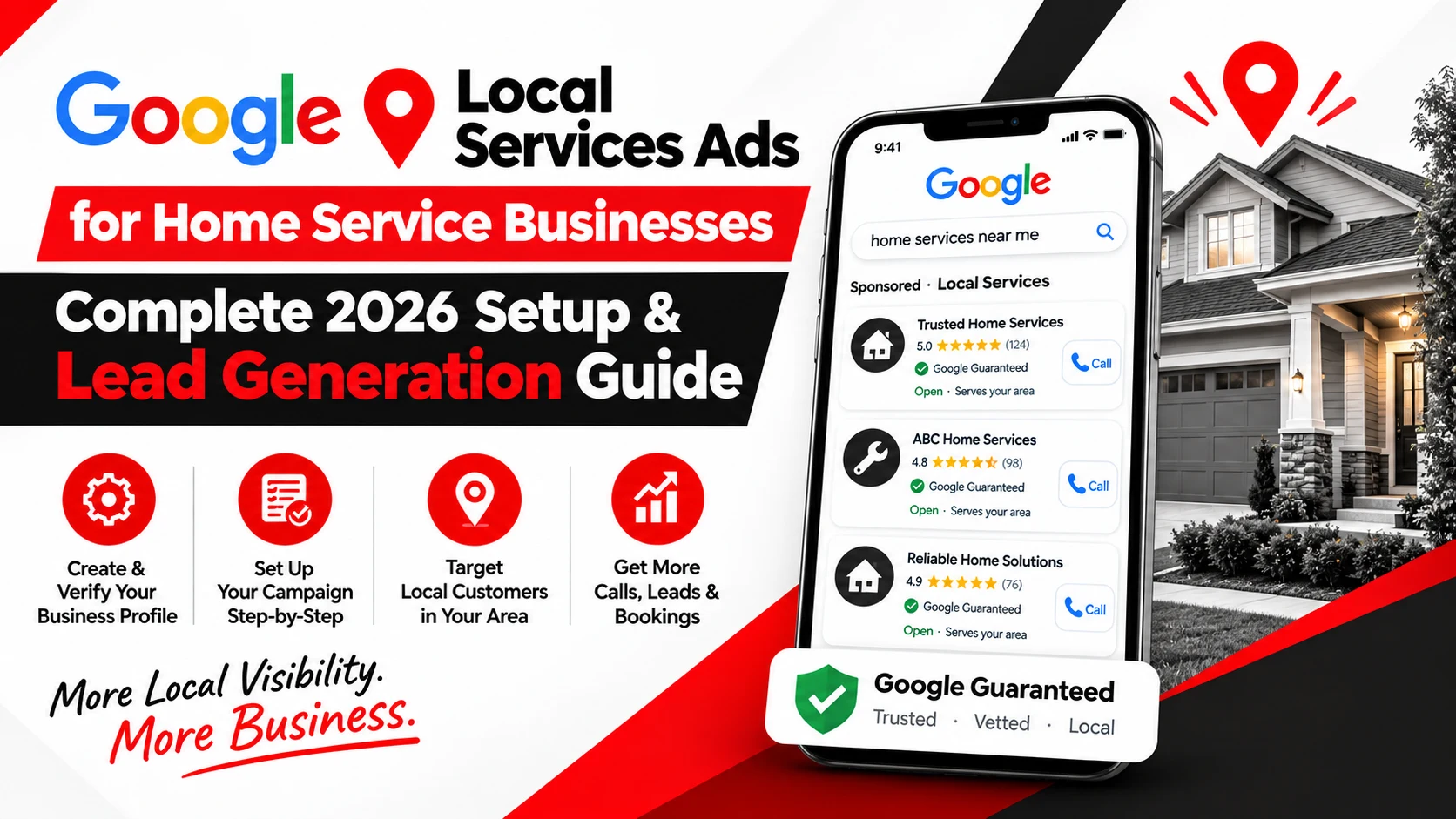
Local Services Ads, often shortened to LSA, is Google's advertising format built specifically for local service providers. Instead of standard text ads, LSA listings appear at the very top of relevant Google search results, above traditional Google Ads and organic listings, with a business name, star rating, service area, phone number, and a "Google Guaranteed" or "Google Screened" badge.
Customers can contact a business directly through the ad by calling or sending a message, and in some categories Google surfaces a request-a-quote or booking option. This is the core difference from most advertising: the ad itself is the contact point, not a link to a website.
A few things define how LSA works:
- Lead-based billing: In most cases, businesses pay for valid leads (calls or messages that meet Google's criteria), not for clicks or impressions.
- Service areas, not just a business address: Businesses set the ZIP codes or cities they serve, and ads only appear to searchers in those areas.
- Reviews are visible in the ad: Star ratings pulled from Google reviews show directly in the listing.
- Screening and verification: Before going live, most categories require some combination of license checks, insurance checks, and background checks, depending on the trade and location.
Local Services Ads vs. Traditional Google Ads
Local Services Ads and standard Google Ads solve different problems, and most established home service businesses eventually use some version of both.
Local Services Ads are built around local service leads specifically. There are no keywords to bid on, no ad copy to write, and no landing page to build. Google matches the ad to relevant local searches automatically, based on category, service area, and profile strength.
Traditional Google Ads campaigns give businesses far more control. You choose keywords, write ad copy, build or select landing pages, and structure campaigns around specific services, locations, or promotions. That control comes with more setup work, but it also allows for more precise targeting, such as bidding aggressively on "emergency AC repair near me" while spending less on lower-intent searches.
Neither format is universally better. LSA tends to work well as a lower-effort, trust-driven entry point for phone calls and messages. Google Ads tends to work well when a business wants more control over messaging, offers, and the customer's path after they click. Many home service companies run both, using LSA for immediate local demand and Google Ads for specific campaigns, seasonal promotions, or services that need more explanation.
Which Home Service Businesses Can Use Local Services Ads?
Local Services Ads covers a wide range of trades, but eligibility is not automatic. Google determines which categories are available based on business type, country, and current policy, and even within an eligible category, individual businesses still need to pass screening.
Categories commonly available to home service businesses include:
- Plumbers
- HVAC contractors
- Electricians
- Roofers
- Pest control companies
- Landscapers and lawn care providers
- Handyman services
- Cleaning companies
- Garage door companies
- Appliance repair businesses
- Locksmiths
- General contractors
- Tree service companies
- Junk removal companies
Availability also depends on location. A category available in one metro area may not yet be supported in another, and some categories carry additional verification requirements, such as advanced background checks for locksmiths or garage door technicians, because of the nature of the work.
Because eligibility, requirements, and available categories change over time, business owners should confirm current eligibility directly through Google's Local Services Ads onboarding tool before planning a campaign or budget around it.
Google Local Services Ads Setup: Step-by-Step
Setting up Local Services Ads correctly the first time saves weeks of back-and-forth with verification and avoids wasted ad spend later. Here is the realistic sequence.
Step 1: Set Up or Review Your Google Business Profile
Local Services Ads pulls from your business information, so accuracy matters before anything else. Confirm your business name matches your legal and marketing name, your phone number is correct and actively monitored, your hours are current, and your primary service category reflects what you actually do.
Step 2: Select the Correct Service Category
Choose the category that most accurately describes your core business. It can be tempting to select adjacent categories to appear in more searches, but mismatched categories tend to produce irrelevant leads and can create problems during verification. A plumbing company advertising under a general contractor category, for example, is likely to get calls it has to turn away.
Step 3: Define Your Service Areas
Set service areas based on where you can realistically dispatch a technician within a reasonable window, not the largest radius Google will allow. Selecting cities or ZIP codes well outside your normal service range usually means paying for leads you cannot fulfil. It is worth reviewing service areas periodically as your team, vehicles, or capacity change.
Step 4: Select the Services You Actually Offer
List the specific services your business genuinely performs, rather than everything technically related to your trade. An HVAC company that only installs residential systems should not list commercial refrigeration if it cannot service that equipment. Overstating services is one of the fastest ways to generate leads that go nowhere.
Step 5: Complete Google's Verification and Screening
This is usually the step that takes the most time. Requirements vary by category and market, but commonly include some combination of:
- Business and owner identity verification
- License checks at the state or local level
- General liability or professional liability insurance
- Background checks for business owners and, in many categories, field workers who interact with customers
Google does not publish a fixed approval timeline, and processing time can vary depending on category, documentation, and local licensing databases. Businesses should gather licensing and insurance documents in advance rather than starting the application before they are ready.
Step 6: Set Your Budget
There is no universal "right" budget for Local Services Ads. A realistic budget depends on expected local demand, how many leads your team can actually respond to and complete, seasonality (HVAC and landscaping, for example, swing heavily by season), local competition, and how much revenue a typical job generates. A business that can only take on five new jobs a week should not set a budget designed to generate thirty leads a week.
Step 7: Improve Your Business Profile
Once live, profile strength affects how often your ad appears and how it performs. Recent, genuine reviews, clear service descriptions, and real photos all contribute to trust signals that influence visibility.
Step 8: Launch and Monitor Leads
After launch, the real work begins. Track incoming calls and messages, how many turn into legitimate inquiries, how many convert to booked appointments, and how many become completed jobs. Early performance data should inform adjustments to service areas, budget, and response process.
How Much Do Google Local Services Ads Cost in 2026?
There is no fixed price for Local Services Ads, and any article claiming a universal average cost per lead should be treated with caution. Cost depends on industry, specific service, geographic market, local competition, and current demand. A locksmith in a small town and an HVAC company in a major metro will see very different numbers.
What matters more than the raw cost per lead is understanding the full path from spend to revenue:
Advertising budget → Leads → Qualified leads → Booked jobs → Revenue
A campaign generating leads at a low cost per lead is not necessarily performing well if few of those leads turn into paying customers.
Useful metrics to track alongside cost per lead include:
- Qualified lead rate: the percentage of leads that are genuinely in-service-area, in-scope, and ready to hire
- Booking rate: how many qualified leads convert into a scheduled appointment
- Cost per booked job: total spend divided by completed bookings, not just leads
- Customer acquisition cost: the full cost of turning a lead into a paying customer, including any follow-up effort
- Revenue per lead: average revenue generated per lead across a given period
- Return on ad spend: where the business has clean enough data to calculate it
Cost per lead alone tells you what you paid. These additional metrics tell you what you got for it.
How to Generate More Qualified Leads From Local Services Ads
This is where most of the value of a Local Services Ads campaign is either created or lost. Generating leads is relatively easy. Generating leads that turn into paying customers takes more deliberate work.
1. Target the Right Service Areas
It is tempting to expand service areas to increase lead volume, but paying for visibility in ZIP codes you cannot serve efficiently usually lowers your qualified lead rate and increases drive time and cost per completed job. Narrower, well-matched service areas often outperform broader ones.
2. Focus on High-Intent Services
Not every search carries the same intent. Someone searching for "emergency water heater repair" is typically ready to book immediately. Someone searching for general information about water heater types is still researching. Local Services Ads tends to perform best for the first kind of search, and businesses that understand this can set expectations accordingly rather than assuming every lead should behave like an emergency call.
3. Build a Strong Review Profile
Reviews are visible directly in the ad, and they influence both trust and visibility. The goal is consistent, genuine feedback from real customers, ideally including specifics about the service performed. Responding professionally to reviews, including less favourable ones, also signals reliability. Attempting to manipulate reviews through incentivised or fake feedback violates Google's policies and risks account suspension.
4. Use Real Business Photos
Generic stock photography does little to build trust. Photos of your actual team, vehicles, equipment, and completed jobs, including before-and-after shots where relevant, help potential customers picture who is showing up at their door.
5. Respond Quickly to Leads
Speed matters more in this channel than almost any other. A homeowner dealing with a plumbing emergency is often calling multiple companies at once. A missed call or a slow callback frequently means the job goes to whoever answered first, regardless of who had the better ad.
6. Track Leads Through to Revenue
This is the step many businesses skip, and it is the difference between a campaign that looks successful and one that actually is.
The full picture looks like this:
Lead → Qualified Lead → Appointment → Job → Revenue
Generating a hundred leads that mostly go nowhere is less valuable than generating forty leads that convert into completed jobs. Businesses that only look at lead volume tend to make budget decisions based on incomplete information.
2026 Google Local Services Ads Changes Businesses Should Know
This transition is happening in phases rather than all at once. Google's documentation indicates that the first phase began in August 2026 for select U.S. advertisers in categories including plumbing, HVAC, electrical, appliance repair, house cleaning, lawn care, roofing, pest control, and moving.
A later 2026 phase is expected to expand to service-area businesses without a physical storefront and accounts using custom bidding or booking setups. Google's documentation indicates that non-U.S. accounts and remaining categories, including those requiring advanced verification such as locksmiths and garage door companies, are expected to transition in 2027.
Depending on the advertiser and market, businesses may still be operating on the legacy Local Services Ads portal while others have already migrated. Google typically notifies account administrators in advance of a migration date through email and in-dashboard notices.
Because this rollout is staged by category and account, and because the exact timeline can shift, business owners should monitor official notifications inside their Google Ads or Local Services Ads account rather than assuming their account has or has not migrated based on general industry commentary. Reviewing current Google Ads Help documentation directly is the most reliable way to understand where a specific account stands.
Common Local Services Ads Mistakes to Avoid
- Choosing the wrong business category: Mismatched categories confuse Google's matching system and attract irrelevant leads.
- Targeting areas the business does not actually serve: This increases spend without improving completed jobs.
- Adding services the company does not provide: This leads to leads that have to be declined, wasting both money and the customer's time.
- Ignoring reviews: A thin or outdated review profile reduces trust and visibility.
- Using weak or irrelevant photos: Generic images fail to differentiate a business from competitors.
- Missing calls and messages: Slow response times are one of the most common reasons booked leads are lost.
- Measuring only lead volume: High lead counts mean little if few convert into paying customers.
- Failing to track booked jobs: Without this data, it is impossible to know true cost per customer.
- Ignoring verification requirements: Letting licenses or insurance lapse can pause or disable an account.
- Treating LSA as the entire marketing strategy: Relying on a single paid channel leaves a business exposed if costs rise or policies change.
Local Services Ads vs. SEO: Should You Use Both?
-
Local Services Ads, local SEO, and Google Ads each play a different role in local visibility, and most successful home service businesses use more than one.
-
Local Services Ads provides paid placement at the top of relevant local searches, tied to service areas, categories, and reviews, with a pay-per-lead model.
-
Local SEO builds organic visibility over time through a well-optimised Google Business Profile, service and location pages on your website, consistent reviews, locally relevant content, and technical SEO fundamentals like site speed and mobile usability. It takes longer to build but does not carry a per-lead cost once established.
-
Google Ads offers a third layer, with more control over keywords, ad messaging, and landing pages than LSA provides, useful for specific campaigns or services that need more explanation than a simple ad listing allows.
-
These channels tend to reinforce each other rather than compete. A business with strong local SEO often sees better performance in Local Services Ads too, since profile strength and reviews influence both. No single channel is a universal winner. The right mix depends on budget, competition, and how quickly a business needs results.
How Ingenious Hi-Tech Helps Home Service Businesses Generate Leads
Ingenious Hi-Tech works with home service businesses across SEO, local SEO, and Google Ads management, along with on-page SEO, off-page SEO, technical SEO, and Google Business Profile optimisation- the same elements that influence how well a Local Services Ads profile performs. On the website side, that includes website development and conversion optimisation, since a customer who calls from an ad still often checks a website before booking. Analytics and tracking tie it together, connecting ad spend to actual booked jobs rather than just lead counts.
The full journey looks like this: Search → Click/Call → Lead → Appointment → Customer. The goal at every stage is a measurable business outcome, not a vanity metric like impressions or clicks alone.
Need help building a stronger local lead-generation strategy? Ingenious Hi-Tech's digital marketing services can help your home service business connect paid advertising, local SEO, website conversion, and lead tracking into a more measurable system.
Frequently Asked Questions About Local Services Ads
Are Local Services Ads available for every home service business?
No. Availability depends on business category, location, and current Google policy. Even eligible categories require passing screening and verification before ads go live.
Do Local Services Ads charge for clicks or leads?
Local Services Ads generally operates on a pay-per-lead model, meaning businesses are charged for valid calls or messages that meet Google's criteria, rather than for clicks or impressions.
How long does Google verification take?
Google does not publish a fixed timeframe, and processing time varies by category, documentation, and location. Having licenses and insurance documents ready in advance helps avoid delays.
Can service-area businesses use Local Services Ads?
Yes, businesses without a physical storefront that serve customers within defined areas can typically use Local Services Ads, though specific requirements can vary by category.
How can I get better-quality LSA leads?
Accurate service areas, honest service listings, a strong review profile, real photos, and fast response times all contribute to better lead quality over time.
Are Local Services Ads better than Google Ads?
Neither is universally better. LSA offers lower-effort, trust-driven visibility for calls and messages. Google Ads offers more control over targeting, messaging, and landing pages. Many businesses use both for different purposes.
Can Local Services Ads replace SEO?
Not entirely. LSA provides paid visibility tied to ad spend, while local SEO builds organic visibility that continues generating traffic without a per-lead cost. They serve different, complementary roles.
What should I track from Local Services Ads?
At minimum, track leads, qualified leads, appointments, booked jobs, cost per lead, customer acquisition cost, and revenue generated, so budget decisions are based on outcomes rather than lead volume alone.
Final Takeaway
Running Local Services Ads successfully comes down to a fairly practical sequence: confirm eligibility, complete verification, list services and service areas accurately, set a budget that matches real capacity, strengthen the business profile, respond quickly to leads, and track performance all the way through to revenue.
The goal was never simply generating more phone calls. It is generating relevant leads that turn into profitable, repeat customers. As Google continues shifting Local Services Ads into its Performance Max structure through 2026 and into 2027, staying informed about how your specific account is affected matters more than chasing every industry rumour about the change.
If your business needs help connecting Local Services Ads, Google Ads, local SEO, and lead tracking into one measurable strategy, Ingenious Hi-Tech can help you build that system with a clearer view of what is actually driving booked jobs.