
Search engines are really smart these days. They also expect a lot from us. You can have a website that looks amazing and has stuff on it, but if the behind-the-scenes work is not good, it will not do well. In 2026, doing the part of search engine optimization is not just something that would be nice to have, it is what makes the difference between people finding your website and not finding it at all.
This list has everything you need to check, fix, and make better: it talks about how search engines look at your website, how your pages are added to the list of websites, and how well and steadily they work for people who are actually using them. If you are just starting out or if you have been doing this for a time, this guide gives you things you can do right now to make your website better.
What Is Technical SEO And Why Does It Matter in 2026?
Technical SEO is like the stuff that happens behind the scenes to help search engines like Google find and understand your website. It is different from the kinds of SEO that focus on the content or links. Technical SEO is about making sure your website is working properly.
In the year 2026, technical SEO is really important for a few reasons. Google can only look at many websites at a time, so if your website is not working right, Google might not even see it. Technical SEO helps with this. Google also looks at how fast and stable your website is; if it is slow or always breaking, you will not show up as high in the search results. There is a lot of content on the internet that was made by computers, so it is hard to make your website stand out with good content. If your website is technically good, that can make a big difference.
Technical SEO is like the foundation of a house. If the foundation is not good, the whole house can fall apart. It does not matter how nice the inside of the house is. Google looks at the version of your website first, so if that is not working well, your website will not show up as high in the search results. Technical SEO matters because it helps with all of these things. Google uses something called Core Web Vitals to decide how high to rank your website, and technical SEO helps with that. Technical SEO is important for your website's infrastructure. It can really help you compete with other websites.
Part 1: Crawlability Help Search Engines Find Every Page
Crawlability is the ability of search engine bots like Googlebot to access and navigate your website. If bots cannot reach your pages, those pages simply will not rank.
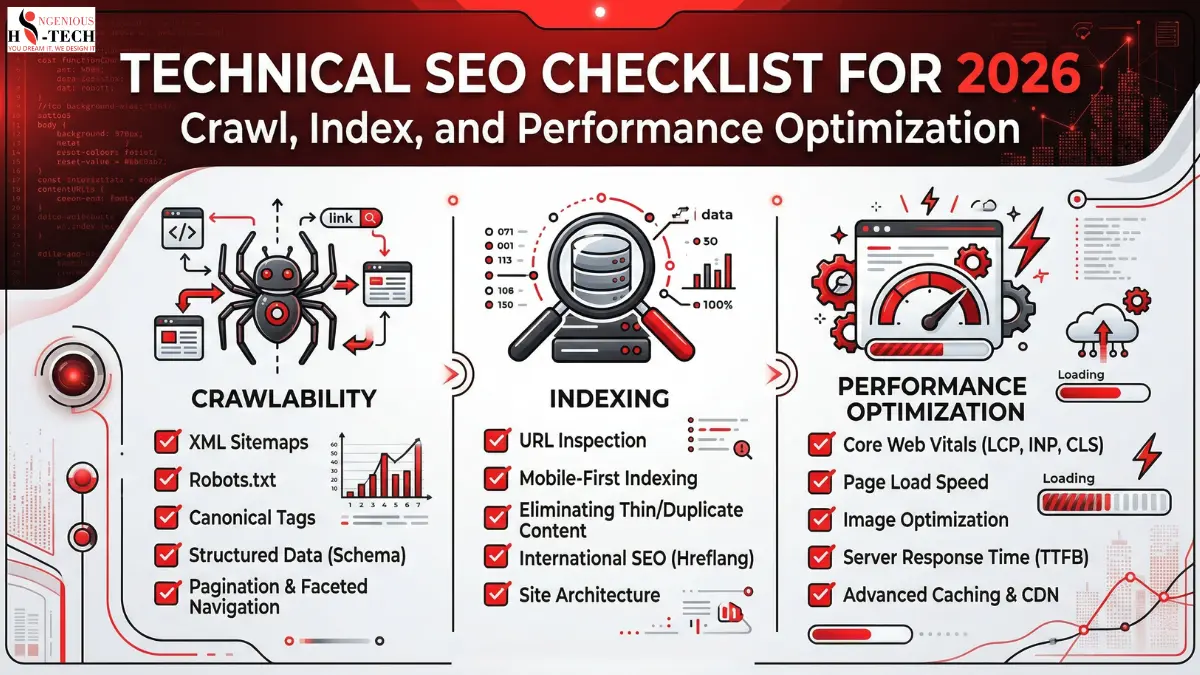
1. Audit Your robots.txt File
Your robots.txt file tells crawlers which pages they can and cannot access. A misconfigured file can accidentally block your most important pages.
Action Steps:
Visit yourdomain.com/robots.txt and review its contents. Make sure you are not blocking the entire website, CSS files, or JavaScript files. Use Google Search Console's robots.txt tester to verify rules. Allow crawling of all pages that you want indexed.
Important Note: Never block pages in robots.txt as a way to hide them from users. Use noindex meta tags instead if you want to keep a page accessible but out of search results.
2. Fix Crawl Errors Immediately
Google Search Console reports crawl errors for pages that Googlebot tried to visit but could not. These errors waste your crawl budget and signal poor site health.
Action Steps:
Log in to Google Search Console and go to the Coverage report to review errors. Fix all 404 page not found errors by either restoring the page or setting up 301 redirects. Resolve server errors by investigating hosting or server-side issues. Use tools like Screaming Frog or Ahrefs Site Audit to find broken internal links.
3. Optimize Your XML Sitemap
Your XML sitemap is a roadmap that guides search engines to your most important pages. A clean, updated sitemap helps bots discover new content faster.
Action Steps:
Ensure your sitemap is submitted to Google Search Console. Include only canonical, indexable pages and avoid 301 redirects, 404 pages, or noindex URLs. Keep your sitemap updated, as most CMS platforms like WordPress and Shopify do this automatically. For large websites, use a sitemap index file that links to multiple smaller sitemaps. Verify that your sitemap URL is listed in your robots.txt file.
4. Manage Your Crawl Budget Wisely
Crawl budget is the number of pages Googlebot will crawl on your site within a given time period. For smaller sites, this is rarely an issue, but for large e-commerce or news sites, it is critical.
Action Steps:
Identify and remove or block low-value URLs such as filter pages, session IDs, and duplicate parameter URLs. Use URL parameter settings in Google Search Console to tell Google how to handle dynamic URLs. Consolidate thin or duplicate content through canonical tags or 301 redirects. Improve site speed, as faster sites get crawled more frequently.
Part 2: Indexability Make Sure the Right Pages Get Indexed
Being crawled does not guarantee being indexed. Indexability is about ensuring that search engines are actually storing and displaying your pages in their search results.
1. Audit Your Index Coverage
Before fixing anything, you need to know what Google has indexed and what it has not.
Action Steps:
In Google Search Console, go to Index and then Pages and review indexed pages and pages that are not indexed, along with the reason why. Use site:yourdomain.com in Google Search to get a rough count of indexed pages. Cross-reference with your actual page count, as large discrepancies indicate indexing problems.
2. Use Canonical Tags Correctly
Canonical tags tell search engines which version of a page is the master version. Incorrect canonicalization leads to duplicate content issues and diluted ranking signals.
Action Steps:
Add the canonical link tag to the head of every page. Make sure self-referencing canonicals exist on all pages. Avoid canonicalizing paginated pages to the first page and use proper pagination markup instead. Check that canonical tags are not pointing to redirected, noindex, or broken URLs.
3. Control Noindex Tags Carefully
The noindex directive tells search engines to exclude a page from their index. While useful for thin or duplicate content, it can accidentally exclude important pages.
Action Steps:
Audit all pages with a noindex meta robots tag. Pages that should be noindexed include thank-you pages, login pages, cart and checkout pages, and admin areas. Pages that should not be noindexed include product pages, blog posts, service pages, and the homepage. After removing a noindex tag, request re-indexing via Google Search Console.
4. Fix Duplicate Content Issues
Duplicate content confuses search engines and splits your ranking authority across multiple URLs. This is one of the most common and most damaging technical SEO mistakes.
Action Steps:
Use tools like Screaming Frog or SEMrush to identify duplicate page titles, meta descriptions, and content. Implement 301 redirects from duplicate URLs to the canonical version. Use consistent internal linking and always link to the canonical version of a page. For e-commerce sites, use canonical tags on product variant pages pointing to the main product page.
Part 3: On-Page Technical Elements: The Details That Define Rankings
1. Optimize Title Tags and Meta Descriptions
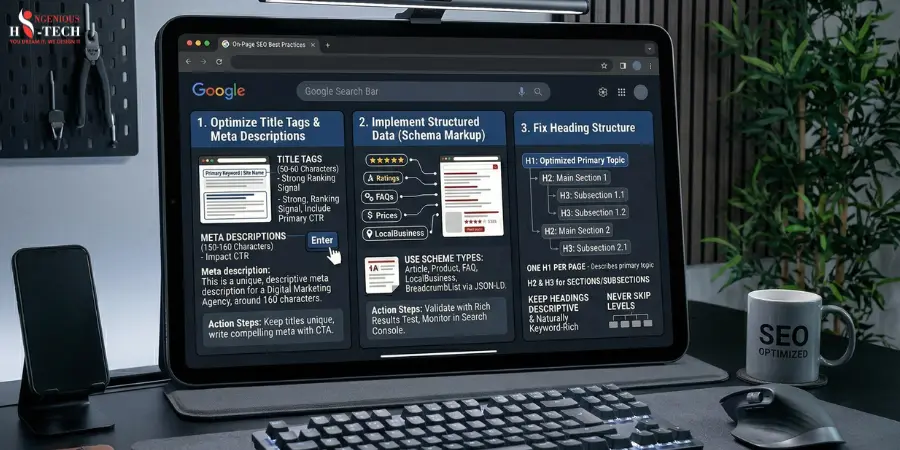
Title tags are one of the strongest on-page ranking signals. Meta descriptions do not directly affect rankings but dramatically impact click-through rates.
Action Steps:
Keep title tags between 50 and 60 characters and include your primary keyword near the beginning. Write unique meta descriptions for every page at 150 to 160 characters with a clear call to action. Avoid duplicate title tags across your site. Use tools like Yoast SEO or rank tracking tools to monitor titles at scale.
2. Implement Structured Data Using Schema Markup
Structured data helps search engines understand your content and enables rich results such as star ratings, FAQs, and product prices in Google's search results. This boosts visibility and click-through rates dramatically.
Action Steps:
Add relevant schema types such as Article, Product, FAQ, LocalBusiness, BreadcrumbList, and HowTo. Use Google's Rich Results Test to validate your schema markup. Implement via JSON-LD format, which is Google's preferred method, inside the head tag. Monitor rich result performance in Google Search Console under the Enhancements tab.
3. Fix Heading Structure
A clear heading hierarchy helps both users and search engines understand the structure and topic of your page.
Action Steps:
Use only one H1 per page and make sure it clearly describes the page's primary topic while including the main keyword. Use H2 tags for main sections and H3 tags for subsections. Never skip heading levels, such as jumping from H1 to H4. Keep headings descriptive and naturally keyword-rich without keyword stuffing.
Part 4: Core Web Vitals and Performance Speed Is a Ranking Signal
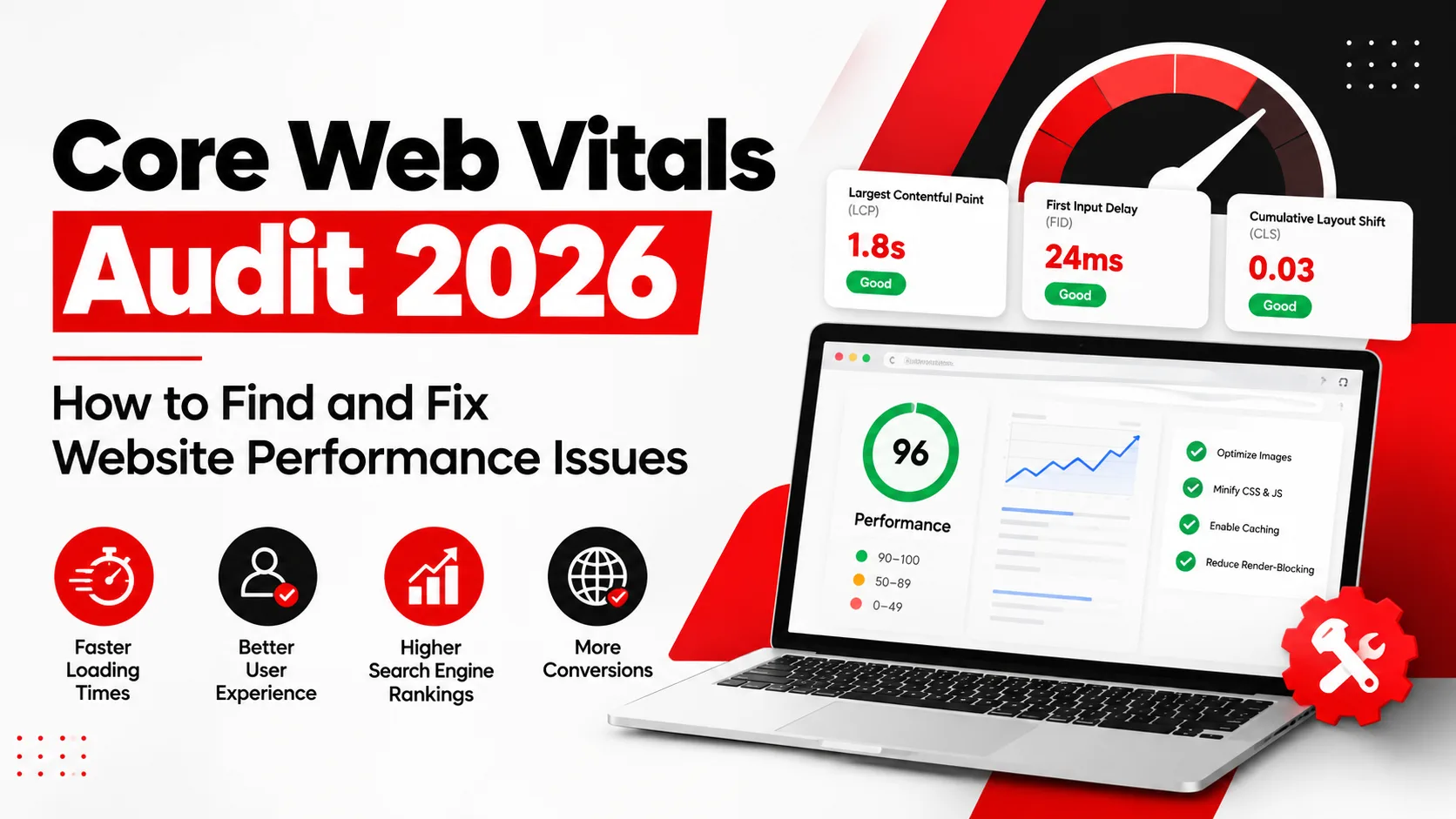
Google's Core Web Vitals are really important to measure how real people experience your website. By 2026, these metrics will be a part of how Google decides which websites to show first.
1. Make Contentful Paint better
Largest Contentful Paint is a measure of how quickly the biggest thing on your webpage loads. You want this to happen in under 2.5 seconds.
Action Steps:
Make your images smaller using formats like WebP or AVIF. Use a Content Delivery Network to get your files from servers that're closer to the people visiting your site. Load the stuff like big pictures and fonts first using a special tag. Do not let JavaScript and CSS slow down your webpage. Get a hosting service because shared hosting can be a problem for Largest Contentful Paint.
2. Make interaction with the next paint better
Interaction to Next Paint is a measure of how long it takes for your webpage to respond to people. This replaced First Input Delay in 2024. You want this to happen in under 200 milliseconds.
Action Steps:
Do not make your webpage do much work on the main part of the site. Break up jobs into smaller ones. Wait to load things that're not important right away so they do not get in the way. Get rid of scripts that're too big and slow, like chat windows and ads.
3. Make Layout Shift better
Cumulative Layout Shift is a measure of how much your webpage jumps around while it is loading. You want this to be under 0.1.
Action Steps:
Always tell your webpage how big pictures and videos are. Leave space for ads and other things so they do not push everything down. Do not add things to the top of your webpage after it has already loaded. Use a way of loading fonts so they do not make your webpage jump around.
4. Turn on Browser Caching and Compression
Action Steps:
Make your files smaller by using Gzip or Brotli on your server. Tell your webpage to remember things, like pictures and fonts, for a time. Use a plugin or a Content Delivery Network to make your webpage load faster when people visit it again.
Part 5: Mobile SEO Non-Negotiable in 2026
Ensure Full Mobile-Friendliness
Since Google fully switched to mobile-first indexing, your mobile site is your SEO presence.
Action Steps:
Test your site with Google's Mobile-Friendly Test tool. Use a responsive design so one codebase adapts to all screen sizes. Ensure tap targets, such as buttons and links, are at least 48 by 48 pixels apart. Avoid using intrusive pop-ups on mobile that block content on first load, as Google penalizes this. Make sure font sizes are at least 16 pixels for comfortable mobile reading.
Part 6: HTTPS, Security, and Site Architecture
1. Use HTTPS Across Your Entire Website
You should use HTTPS on your website. Google uses HTTPS as a way to decide how to rank your website. It helps users trust your site. If your site is still using HTTP, you need to fix this as soon as possible.
Action Steps:
You need to get an SSL certificate. You can get one for free from Let's Encrypt. Then you need to send all the people who go to your HTTP pages to the HTTPS pages instead. You also need to update all the links and pictures on your site to use HTTPS. You need to make sure all the other things, like your canonical tags and sitemap, are using HTTPS too.
2. Optimize Your URL Structure
You want your website addresses to be easy to understand and make sense. This helps people and search engines like Google.
Action Steps:
Make your website addresses short and easy to understand. Use a hyphen to separate words with an underscore. Try not to use things that can change a lot. Use a system that makes sense, like domain.com/category/subcategory/page-name. Do not ever change the address of a page without setting up a redirect.
3. Audit Your Internal Linking Structure
The links inside your website help spread importance to all the pages. Help search engines find new things.
Action Steps:
Make sure you can get to every page in just a few clicks from the front page of your site. Use words that describe what the link is about when you link to another page. Do not use words like "click. Fix all the links that do not work. Group similar. Pages together, by linking them. Use a kind of navigation on the pages that list things and the pages that sell things.
Part 7: Monitoring and Ongoing Maintenance
Technical SEO is not a one-time task. It requires regular auditing and monitoring to stay ahead of issues.
Set Up Ongoing Technical SEO Monitoring
Tools to Use Regularly:
Google Search Console helps you monitor index coverage, Core Web Vitals, manual actions, and rich results weekly. Google Analytics 4 lets you track organic traffic trends, bounce rates, and page experience signals. Screaming Frog SEO Spider is ideal for running monthly full-site crawl audits. PageSpeed Insights and Lighthouse help you check Core Web Vitals scores after major site updates. Ahrefs or SEMrush allows you to monitor backlink health, keyword rankings, and technical audit alerts.
Monthly Checklist:
Check for new crawl errors in Google Search Console. Review Core Web Vitals field data for any drops. Run a crawl audit to catch new broken links or redirect chains. Confirm that new pages are being indexed within one to two weeks of publication.
Final Thoughts: Technical SEO Is Your Competitive Advantage in 2026
Most website owners put a lot of money into making content and getting links. They forget about the basics. When it comes to websites, there is a lot of competition. It gets harder every day. This is because there is so much content made by computers that it fills up every area. So a website that is technically good will stand out.
If you go through this list one step at a time, you will not just be fixing problems. You will be making a website that search engines think is good for users, and computers reward it all the time.
Start with the things that will make a difference. Fix the problems that stop search engines from looking at your website and the issues with your website's map of the website. Fix the problems that stop search engines from listing your website and check for things like noindex issues. Make your website faster and better, especially on phones, when it comes to how it loads and how it works. Make sure your website is safe and works on phones. Set up a way to watch for problems so you can fix them before they hurt your rankings.
Making your website technically good is not the exciting thing to do, but it is the base that makes everything else work. If you fix the base, then the content, links, and plans you have will finally work as they should.
Frequently Asked Questions:
1. What is Technical SEO and why does it matter in 2026?
Technical SEO focuses on optimizing your website’s infrastructure, so search engines can efficiently crawl, index, and render your content. In 2026, it’s critical because search engines rely heavily on AI-driven indexing, user experience signals, and real-time performance metrics.
2. What is crawling, and how can I optimize it?
Crawling is the process by which search engine bots discover pages on your site.
To optimize crawling:
- Maintain a clean XML sitemap
- Use robots.txt correctly
- Fix broken links and redirect chains
- Ensure internal linking is strong and logical
3. How do I improve my website’s crawl budget?
Crawl budget is the number of pages search engines crawl on your site within a given time.
Improve it by:
- Removing duplicate and low-value pages
- Fixing crawl errors
- Improving site speed
- Using canonical tags properly
4. What is indexing, and why are my pages not indexed?
Indexing is when search engines store and organize your content for search results.
Common reasons pages aren’t indexed:
- Noindex tags
- Poor content quality
- Duplicate content
- Blocked by robots.txt
- Weak internal linking
5. How can I ensure proper indexing of my pages?
- Submit updated XML sitemaps
- Use internal links to important pages
- Avoid orphan pages
- Monitor via Google Search Console
- Use canonical tags to prevent duplication issues
6. What are Core Web Vitals, and are they still important in 2026?
Yes, Core Web Vitals remain crucial. They measure:
- Loading performance (LCP)
- Interactivity (INP replaced FID)
- Visual stability (CLS)
They directly impact rankings and user experience.
7. How can I improve website performance for SEO?
- Optimize images (next-gen formats like WebP/AVIF)
- Minify CSS, JS, and HTML
- Use a CDN
- Enable lazy loading
- Reduce server response time
8. What role does mobile-first indexing play in 2026?
Mobile-first indexing means Google primarily uses your mobile site for ranking and indexing.
Ensure:
- Responsive design
- Fast mobile load speed
- Content parity between desktop and mobile
9. What is structured data, and why should I use it?
Structured data helps search engines understand your content better and enables rich results (like FAQs, reviews, and snippets).
In 2026, it’s essential for visibility in AI-powered search features.
10. How do JavaScript-heavy websites affect SEO?
Search engines can render JavaScript, but not always efficiently.
Best practices:
- Use server-side rendering (SSR) or static rendering
- Avoid blocking important content behind JS
- Test with URL inspection tools